Cargo-Planner Docs
Front and rear decks
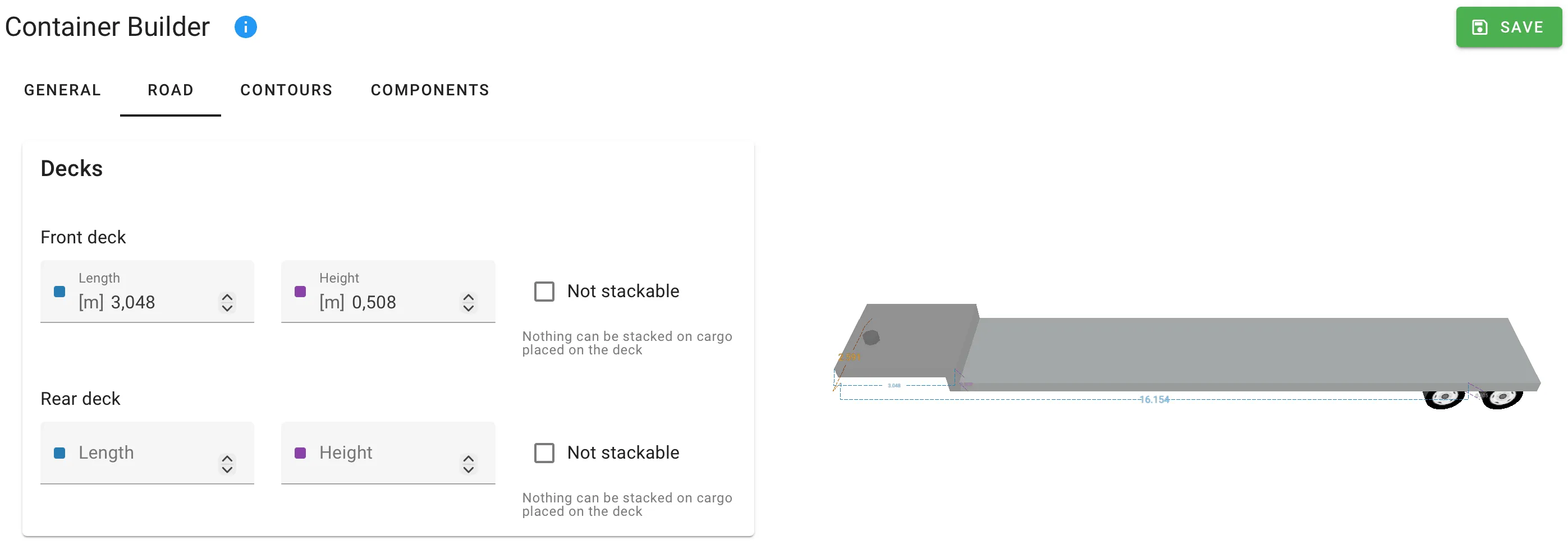
Use the Decks card on the Road tab to describe trailers with raised loading platforms at the front or rear — step-decks, low-boys, drop-decks and any custom shape where the deck height changes along the length of the trailer.
The Decks card is only in the full container editor. Reach it from Equipment in the main navigation → Road tab → open a trailer. Editing library equipment requires the Equipment Editor permission.
Front deck and Rear deck
The card has two identical sub-groups, Front deck and Rear deck. Each deck spans the full width of the trailer — there is no width input.
| Field | Meaning | Unit |
|---|---|---|
| Length | How far the raised area reaches from that end of the trailer. Set to 0 when there is no raised deck at this end. | Length |
| Height | How much higher the deck sits above the main floor. | Length |
| Not stackable | When on, no cargo can be stacked on items placed on this deck. | Boolean |
Mezzanine decks
A mezzanine — a horizontal floor at any height inside the container — is modelled as a floor component, not as a deck. Front and rear decks are limited to protrusions from the ends of the trailer.
Related
- Axles and legal limits — the rest of the Road tab.
- Components — walls, corners, frames and floor components for shapes decks cannot describe.